If you’ve spent any time at all on Facebook or YouTube, you’ve no doubt seen examples of the panoramic 360 videos that are starting to be more and more common. You used to need a very expensive specialty camera, costing thousands, or be willing to cobble together six GoPros if you wanted to play with 360 video, but over the last couple of years, some affordable consumer products have been hitting the market, making this cutting edge technology available to far more of us.
Last month, I decided the market was mature enough, and after a few days of research, I decided to buy the 360 Fly 4K camera. This particular device shoots 360×180 spherical video, and is a single-lens device, costing around $500 (I’m rounding up by a penny). Note that if you want to shoot “true 360”, it requires more than one camera, and given the fact that my primary interest is shooting videos from my car on the race track, that’s not really a requirement. Several of 360Fly’s competitors support cobbling together multiple cameras, but not the 360Fly. If that’s important to you, this camera might be the right one, but for me, it was perfectly adequate. True 360 also adds another complex processing step in the editing workflow, as you have to stitch the multiple video streams together into a single 360×360 video.
The device is very well engineered and comes in some packaging that would impress the folks at Apple. The camera is basically a ball just about 2 inches in diameter, with one and only one button, and a special magnetic docking station for charging and connecting the device to your computer. Included with the base product are the charging dock, and some mounting hardware. When I purchased all of this stuff via Amazon, I also bought the adapter which allows you to use your existing GoPro mounting hardware, but it turns out that was actually included as a base accessory, so you do not need to purchase it separately. The led provides feedback through colors and flashing, as well.
Setting up the device and working with its software, however, was not terribly impressive. I may not be the target audience for those applications, however, as they try to make it very easy to copy videos from your camera to either your smartphone or laptop, and then publish them to YouTube, Facebook or the 360Fly website. The smartphone application is also used to control the device remotely, for example to start/stop recording without physically touching the device, but since I have 8 cameras attached to my car (yes, I have gone a bit overboard) I’ve got a routine for turning them all on. What’s one more button to push? You have to use the smartphone app to configure the device, and I found it to be fairly clumsy.
For starters, the phone communicates with the device by both WiFi and Bluetooth, and be warned that if you find that you need to perform a factory reset and start over, you will need to be sure to tell your smartphone to forget about both the WiFi network and the Bluetooth connection, or you will struggle to get it reconfigured. This device is a relatively new hardware product, and that inevitably means that there will be firmware bugs. I encountered a couple of them, and had to perform several factory resets while getting the device setup the way I wanted, and it was not a fun process to perfect.
The settings matter, too. For example, by default, the device will shoot 4K video @ 24 fps and it is only with the slower frame rate that you can watch the video live on the smartphone. This is something I will never need to do, and since I shoot everything else at either 30 fps (29.97 fps, in reality) or 60 fps, I had to be sure I changed the default resolution. If you are NOT interleaving this video with any others, then the higher frame rate won’t in practice make much difference, but I am doing telemetry overlays and picture-in-picture, so using matching frame rates makes my life a bit simpler.
On your laptop, there’s an application (360 Director) for editing and uploading the videos captured from the camera, but it is primarily intended for users who don’t plan to do very much editing before they share things. The software has very minimal editing capabilities, and if you aren’t careful, you will run out of disk space in a big hurry. 360 Director’s data management is not very well thought out. There’s a single “database” file which contains all of the videos and photos you have uploaded, but when you edit individual videos, a backup copy is saved outside of that database. If you do not take care to manage this space, then multiple edits will produce multiple backup files, and these can be huge. This software can also be used to export your raw or edited 360 videos for use in other editing software as well.
I did not spend very much time with 360 Director as an editor at all, once I found out that the primary editing software that I use for my track days (RaceRender 3) can work with the raw 360 video directly. Since the camera acts as a USB mass storage device when connected to your laptop, extracting the videos you’ve taken is as simple as dragging and dropping, and there really is no need to use 360Fly’s software at all. This is important for advanced users who intend to use the raw video in more advanced editors, such as Final Cut Pro or Adobe Premiere (neither of which I own — I currently use Corel VideoStudio, which does NOT yet support 360).
The biggest problem I had initially was getting and keeping the device charged. Although a recent firmware update has addressed this, originally the device did not work correctly with Apple’s USB chargers, and guess what I own 100s of? Normally, I run two sessions on track in the morning, and then charge everything over lunch to get through another pair of sessions in the afternoon. The first 2 days I used the camera on track, it didn’t make it through the day, but this shouldn’t be a problem going forward.
Editing 360 video is a bit of a learning process, especially if you work with software that doesn’t fully support 360. In my case, since RaceRender supports it by default, there was really nothing special to do at all, and although I was prepared to struggle for days to figure it all out, it Just Worked. This is a huge credit to the RaceRender developers, who put out a very stable, feature rich and easy to use product. Be prepared to invest some time understanding the format and it’s limitations, if you want to do anything fairly advanced.
Uploading the videos to Facebook or YouTube took some experimentation to get right as well. You can’t just upload the raw 360 footage from the camera, as you will just “see” the raw spherical footage. The video has to be converted to an equirectangular format, with the appropriate 360 metadata embedded in the file, in order to be recognized as a panoramic video. I currently do not have a means of previewing the 360 videos on my laptop, either without trying to load the edited videos back into 360 Directory, and that produced incorrect results anyway — the video rotated around the wrong axis, but worked fine when uploaded to YouTube and then viewed via Chrome. This really is a leading/bleeding edge technology, so expect things to break, and be prepared to do some work to figure out why.
The end results are, however, pretty damn cool, and worth the effort. Now, I will admit that I do not find the format to be terribly useful for studying how good or bad (sadly, often the latter) I’m driving, but it sure looks cool and the videos are fun to watch and interact with. I plan to continue running the 360Fly along with the rest of my GoPros, and make the results available, but I’m undecided on the long term value of these videos, at least as a self-education tool for becoming a better driver. But damn, they look cool….
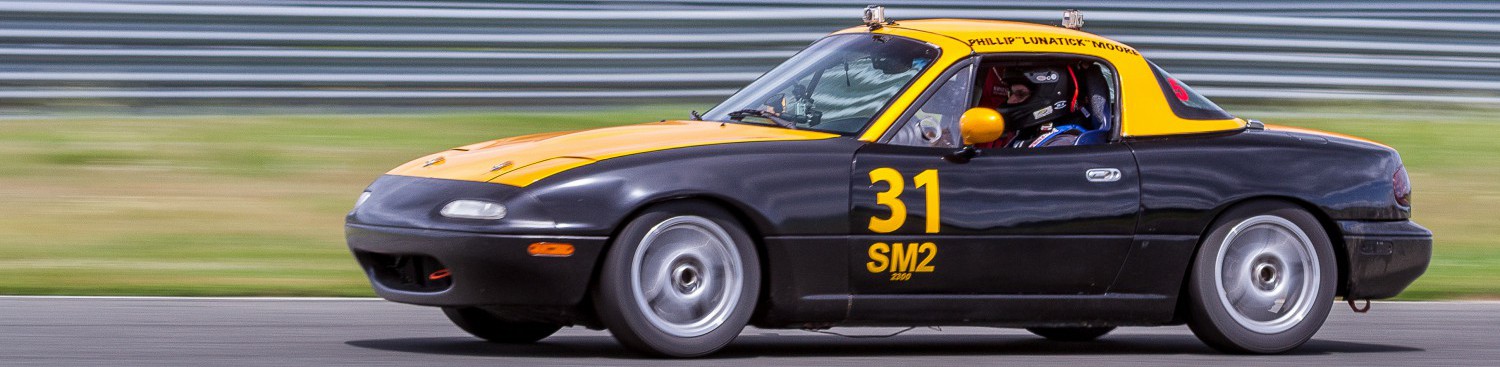
Here’s a lap around Monticello Motorsports Club in my Spec Miata, in 360. I pretty much had the course to myself that day.
Monticello Motorsports Club in 360
And just to show that I have interests outside of the racing world…. a kitten video:
 Lunatick Racing